
Introduction: The Cost of a Sluggish Website Speed Optimization for Your Digital Survival Online users possess zero patience for lagging web pages. If your platform takes more than three seconds to load, clients will bounce to competitors instantly. Beyond human frustration, search engines penalize poor web performance severely. Therefore, web developers must prioritize speed optimization before loading times destroy visibility and conversion rates. Core Web Vitals and Site Performance Google evaluates real-world user experience using three core metrics. Specifically, these include Largest Contentful Paint for loading performance, Interaction to Next Paint for responsiveness, and Cumulative Layout Shift for visual stability. When any metric fails, rankings drop instantly. Consequently, mastering technical performance enhancements and repairing your underlying infrastructure becomes an urgent priority. Taking Control of Your Web Metrics Diagnosing performance bottlenecks does not require guessing. Instead, systematic code cleanup, image compression, and smart server caching drive success. Through professional speed optimization strategies, technical teams drastically improve site responsiveness. Ultimately, maintaining these techniques ensures your digital assets remain lightning-fast and search-engine friendly. Identifying Your Core Web Vitals Bottlenecks Analyzing Real-World Field Data Before attempting comprehensive site enhancements, you must identify infrastructure flaws. For instance, Google PageSpeed Insights and the Chrome User Experience Report provide valuable performance data. While lab tests simulate controlled environments, field data measures human visitor experiences. Analyzing this data through targeted technical checks reveals the precise code blocks dragging down your scores. Pinpointing LCP, CLS, and INP Failures Each Core Web Vitals metric points to a specific technical flaw. For example, a failing LCP usually indicates a massive hero image, slow server response, or unoptimized fonts. Meanwhile, layout shifts stem from dynamic ads or unreserved media dimensions. Finally, high interaction latency points to heavy JavaScript execution, which proper technical fixes quickly resolve. Step-by-Step Strategies for Effective Web Performance Optimizing Largest Contentful Paint (LCP) To resolve LCP failures through targeted speed optimization, you must accelerate primary visual elements. First, start by compressing high-resolution hero images into formats like WebP or AVIF. Furthermore, exclude primary images from lazy loading. In addition, implement preloading tags for crucial CSS and font files to speed up browser rendering. Eliminating Cumulative Layout Shift (CLS) Visual stability is essential for a professional user experience. As part of your routine maintenance, define explicit width and height attributes for all media elements. Additionally, avoid inserting dynamic content above existing elements after initial rendering. Consequently, this ensures a completely stable reading environment. Reducing JavaScript Execution Overhead Heavy scripts running in the background severely impact responsiveness. To execute successful code streamlining, audit plugins and remove redundant trackers. Moreover, defer non-essential scripts and break long tasks into smaller asynchronous functions as part of your overall workflow. Keeping the main browser thread clear thus enables immediate user interactions. Comparative Matrix: Unoptimized Web Stacks Versus Fast Infrastructures Server Response Time and Time to First Byte (TTFB) Unoptimized server setups force browsers to wait for backend database queries. In contrast, advanced caching environments and Content Delivery Networks leverage modern delivery pipelines. Specifically, these networks reduce TTFB to milliseconds globally. Resource Payload and Asset Management Websites bloated with uncompressed scripts consume excessive bandwidth and cripple mobile performance. Conversely, streamlined assets and modern tuning techniques ensure instant delivery across all devices, keeping engagement metrics exceptionally high. Best Practices for Long-Term Performance Maintenance Implementing Automated Monitoring Web performance maintenance is an ongoing process rather than a one-time fix. Therefore, technical teams should integrate automated monitoring tools into development pipelines. Tracking ongoing speed metrics after every major code deployment protects search rankings from unexpected drops. Streamlining Third-Party Script Integrations Marketing tags, analytics pixels, and chat widgets introduce hidden bottlenecks. To maintain blazing speeds through rigorous plugin auditing, load non-critical third-party scripts asynchronously. Furthermore, using container management delays execution until after main content renders completely. Advanced Caching Techniques and Content Delivery Networks Leveraging Global CDNs for Advanced Website Acceleration Scaling web platforms across international regions requires distributed infrastructure. Naturally, relying on a single origin server creates severe performance bottlenecks. By integrating a high-performance Content Delivery Network as part of your core setup, you cache static assets closer to users. Consequently, global visitors experience significantly reduced latency and rapid response times. Implementing Edge Caching Protocols Fine-tuning server cache-control headers prevents redundant database requests. Moreover, configuring advanced caching rules like stale-while-revalidate ensures visitors receive instantly cached content. Meanwhile, fresh updates fetch silently in the background. Ultimately, this seamless technical execution elevates your overall infrastructure framework. Mobile-First Speed Optimization Strategies Overcoming Mobile Network Constraints Most global web traffic originates from mobile devices operating on varying cellular speeds. If your platform is optimized only for desktop connections, mobile users will experience frustrating delays. Therefore, targeted speed optimization must prioritize mobile-first performance, stripping away heavy DOM trees for smaller screens. Compressing Assets and Streamlining Touch Responsiveness Mobile browsers possess limited processing power, making them vulnerable to heavy JavaScript execution. Executing rigorous mobile layout tweaks requires minimizing main-thread blocking tasks. Furthermore, compressing visual assets and ensuring touch interactions respond without lag through proper performance tuning secures higher mobile search rankings. Database Maintenance and Server-Side Query Tuning Cleaning Up Database Bloat for Peak Performance Database systems accumulate unnecessary clutter like post revisions and transient data over time. When backend databases become bloated, server execution times skyrocket. Regularly cleaning and indexing database tables via dedicated maintenance ensures backend queries resolve instantly, thereby supporting rapid page rendering. Eliminating Resource-Hungry Plugins Running poorly coded plugins forces servers to work overtime during HTTP requests. Consequently, technical teams must audit database interactions and replace heavy plugins with lightweight alternatives. Streamlining database queries thus reduces Time to First Byte and prevents server timeouts. Leveraging Modern HTTP Protocols and Compression Upgrading to HTTP/2 and HTTP/3 Protocols Older network protocols process requests sequentially, creating severe bottlenecks during asset loading. Upgrading hosting environments to modern HTTP/2 or HTTP/3 protocols enables multiplexing. Allowing multiple assets to download concurrently acts as a vital pillar in performance enhancement. Implementing Gzip and Brotli Compression Algorithms Compressing text-based assets before network transmission is crucial. Specifically, modern compression algorithms like

Localized Edge SEO: The Ultimate Multi-Region Guide
Introduction: The Multi-Region Performance Challenge Expanding Beyond Borders via Localized Edge SEO Scaling a digital platform or web application to serve global audiences through localized edge SEO is indeed a major milestone for modern tech companies and ambitious enterprises. However, expanding into multiple international markets introduces a complex web of technical challenges. Traditional server-side architectures often struggle to deliver sub-second responses to users located continents away from the primary data center. Consequently, developers and digital marketers frequently turn to edge computing to bridge this geographical gap. The Core Web Vitals Trade-Off While edge networks help route content closer to international users, improper implementation of geo-targeting scripts, localized currency converters, and dynamic multi-language translation widgets can heavily bloat your page weight. Furthermore, if your infrastructure is poorly configured, your attempts at global expansion will quickly tank your Google Core Web Vitals. Maintaining high-speed performance across international borders therefore requires a strict, strategic synergy between localized edge SEO and clean front-end architecture. Shifting to Modern Edge Delivery To succeed in global search results, technical teams must move away from sluggish legacy hosting setups. By leveraging edge workers, global CDNs, and smart rendering strategies, businesses can deliver hyper-localized content instantly. Ultimately, understanding this balance remains essential for maintaining top-tier search visibility worldwide. How Edge Computing Drives Technical SEO and Global Search Rankings What Is Edge Computing and Why It Matters Edge computing decentralizes server processing by executing code on distributed nodes located physically closer to the end user. Instead of routing every request back to a centralized server in a different country, edge networks—such as Cloudflare Workers or Vercel Edge—handle data processing at the nearest network point of presence (PoP). This drastic reduction in Time to First Byte (TTFB) provides a massive foundational boost for international search performance. The Intersection of Global Infrastructure and Search Crawlers Global search engine crawlers evaluate your website from multiple regional viewpoints. Moreover, if an international bot experiences high latency or inconsistent rendering caused by overloaded server-side logic, your multi-region indexing suffers. Implementing localized edge SEO successfully ensures that search bots receive fast, regionally accurate responses, thereby improving cross-border crawl efficiency. Dynamic Geo-Routing Without Latency Penalties Automatically directing users to their correct regional language or currency subfolder traditionally required heavy redirection scripts that slowed down page rendering. Modern edge logic handles geo-routing instantly at the network layer, preventing unnecessary redirect chains and keeping performance metrics safely in the green zone. Common Bottlenecks That Destroy Core Web Vitals on Multi-Region Sites Heavy Client-Side Localization Scripts A frequent mistake made by development teams involves relying on heavy client-side JavaScript to detect user location, swap currencies, and translate text strings. When the browser has to execute massive localization bundles before rendering the page, the Largest Contentful Paint (LCP) spikes drastically, signaling a poor user experience to search engines. Unoptimized Multi-Language DOM Rendering Generating content dynamically for dozens of language variants often introduces unpredictable layout shifts. If fallback fonts load slowly or localized banners push content down after initial paint, your Cumulative Layout Shift (CLS) score degrades. Consequently, this structural instability damages your international search rankings. Bloated Third-Party Geo-Plugins Overloading a global website with disjointed translation plugins and regional popup tools creates a tangled web of external HTTP requests. Each third-party script acts as a performance bottleneck, pulling down your overall page speed and harming your international localized edge SEO efforts. Comparative Matrix: Traditional Server Hosting Versus Edge-Optimized Multi-Region Stacks Global Latency and Time to First Byte (TTFB) Traditional centralized hosting forces international users to wait seconds just for the initial server handshake, resulting in high bounce rates. In contrast, edge-optimized architectures reduce TTFB to milliseconds globally, keeping engagement high and satisfying strict Core Web Vitals benchmarks. Scalability and Bandwidth Management Managing high traffic spikes across multiple time zones can easily crash traditional servers or trigger massive cloud bills. Fortunately, edge networks absorb and distribute traffic spikes smoothly across global nodes, ensuring rock-solid stability and seamless multi-region deployment. Best Practices for Maximizing Localized Edge SEO and Speed Shifting Rendering Logic to the Edge Move your multi-region personalization, header manipulation, and language routing scripts away from the origin server and directly onto edge workers. Processing these tasks at the network edge ensures that fully rendered, localized HTML reaches the user instantly. Implementing Smart Caching and Stale-While-Revalidate Configure your CDN and edge nodes to utilize advanced caching strategies like stale-while-revalidate. This allows regional users to receive instantly cached static assets while background processes fetch fresh updates, maximizing speed without compromising data accuracy. Overcoming Common Pitfalls in Multi-Region Edge Deployments Avoiding Cache Invalidation Nightmares Implementing edge caching across international nodes significantly boosts performance, but it introduces unique data synchronization challenges. When your development team updates product prices, multi-language copy, or structural layouts, stale content can occasionally get trapped in distant regional edge nodes. Consequently, businesses often experience inconsistent user experiences where different countries see conflicting information. To solve this, technical architects must implement robust cache-tagging systems and automated purge mechanisms that clear stale assets globally within seconds of an update. Managing Geo-IP Detection Flaws and Fallbacks Another frequent mistake during global rollouts involves relying entirely on faulty IP-to-location databases. If a regional network lookup fails or misinterprets a user’s geographical coordinates, the visitor might be locked out of their preferred language or currency subfolder. Therefore, resilient applications must incorporate reliable fallback mechanisms, allowing manual language selection while preserving clean URL structures that search engine crawlers can index without getting trapped in redirect loops. Future-Proofing Your Global Web Infrastructure Scaling Technical Infrastructure for Sustainable Growth As your digital footprint expands into emerging international markets, maintaining sub-second delivery speeds becomes increasingly demanding. Traditional server stacks crumble under sudden traffic surges, whereas modern edge architectures distribute the computational load effortlessly across thousands of global nodes. By decentralizing your backend logic, your brand ensures uninterrupted availability, protecting both user trust and long-term search engine standing. Aligning Development Teams with Global SEO Strategies Finally, achieving top-tier performance requires seamless collaboration between front-end developers, DevOps engineers, and digital marketing specialists.

No-Code Extensions Security Risks (2026)
Introduction: The Illusion of Safety in Visual Development Ecosystems The Rapid Rise of Visual Environments via No-Code Extensions The software development landscape has shifted dramatically, with startups and enterprises alike embracing platforms like Webflow, Wix Studio, and WordPress powered by no-code extensions to accelerate digital delivery. These visual environments allow teams to launch fully functional web apps and corporate sites in days rather than months. However, this unprecedented speed often creates a dangerous psychological illusion: the assumption that infrastructure-level safety equals complete application security. Platform Security Versus Application Vulnerabilities While major platform vendors manage hosting security, SSL configurations, and core uptime, they do not control how third-party plugins, widgets, and custom scripts handle data. Consequently, the responsibility of maintaining a secure architecture falls squarely on the creators. When development teams integrate external modules without rigorous code audits, they introduce deep security blind spots directly into production systems. Shifting Focus to the Real Threat Vector Security breaches in modern web architectures rarely occur because the underlying cloud infrastructure failed. Instead, attackers target the fragile connective tissue—the third-party no-code extensions, API bridges, and form handlers—that power everyday site functionality. Understanding these risks is critical for engineering teams aiming to build resilient digital assets. Common Security Vulnerabilities Handled by No-Code Extensions Unvetted Code and Abandoned Repositories The vast marketplaces of WordPress plugins, Wix app markets, and Webflow community components contain thousands of add-ons built by independent developers. Many of these packages lack active maintenance, leaving unpatched CVE records open for exploitation. When an outdated plugin features a backdoor, malicious actors can easily leverage it to inject malware, deface pages, or hijack admin controls. Loose Access Controls and Client-Side Logic Flaws Many visual builders rely heavily on client-side permission checks rather than strict server-enforced rules. For instance, if a no-code extension hides administrative UI elements based solely on front-end conditional visibility, sophisticated users can manipulate browser tools or API endpoints to bypass restrictions. This structural flaw opens paths to unauthorized data modification and privilege escalation. Unsanitized Form Inputs and Injection Vectors Modules that handle user input—such as feedback forms, dynamic calculators, or login portals—frequently fail to sanitize data properly. If a third-party script provided by no-code extensions passes raw strings directly into database queries or DOM elements, systems become instantly vulnerable to SQL injection and cross-site scripting (XSS) attacks. Data Exposure Risks via Loose API Connectors and Webhooks The Danger of Exposed API Keys No-code workflows thrive on connectivity, using webhooks and API tokens to sync data with external CRM platforms, payment gateways, and databases. However, developers often misconfigure these connectors when setting up various no-code extensions, exposing secret API keys within client-side JavaScript code. Once exposed in browser inspect tools, these credentials allow attackers to extract or manipulate backend databases. Publicly Accessible Data Views A recurring vulnerability across modular web stacks involves misconfigured privacy permissions on data views managed by external tools. Relying on obscure URLs or hidden UI lists to protect sensitive user information fails because automated crawlers or network sniffers can index these endpoints. Ensuring strict, token-authenticated data fetching is essential to prevent unexpected data leaks. Comparative Matrix: Native Security Versus No-Code Extensions Risk Architectural Control and Attack Surface Relying strictly on native platform code minimizes the overall attack surface because core features undergo rigorous internal testing. Conversely, adding dozens of third-party no-code extensions exponentially expands the threat landscape, as every added module acts as a potential entry point for attackers. Maintenance Overhead Versus Speed While third-party add-ons provide instant features, they introduce severe long-term maintenance overhead. When a core platform updates its framework, unoptimized plugins often break or expose security flaws, forcing engineering teams into reactive firefighting rather than proactive feature development. Best Practices for Hardening No-Code and Low-Code Environments Implementing Strict Extension Audits for No-Code Extensions Organizations must establish a centralized vetting process before installing any third-party no-code extension. Teams should review update frequencies, developer reputations, and permission requirements to ensure the add-on complies with enterprise security standards. Enforcing Server-Side Validation and Zero-Trust Principles Never trust client-side restrictions. Ensure all data processing, permission checks, and input sanitization routines occur securely on the server side. Adopting a zero-trust architecture ensures that every data request undergoes strict verification, safeguarding the application against unauthorized access. Frequently Asked Questions (FAQs) Q1: What are the main security risks of using third-party no-code extensions? Third-party add-ons often lack rigorous maintenance, leaving unpatched vulnerabilities, loose access controls, and unsanitized input fields that malicious actors can exploit to breach application data. Q2: Do platforms like Webflow or WordPress take care of all security requirements? Platform vendors handle core infrastructure security, hosting safeguards, and SSL certificates, but they do not manage the custom code, scripts, or installed no-code extensions. Q3: How do exposed API keys compromise low-code web applications? If API keys or webhooks connected through no-code extensions are improperly embedded into client-side code, attackers can easily uncover them using browser inspection tools and gain unauthorized access to backend databases. Q4: What is client-side logic vulnerability in visual platforms? It occurs when security checks or administrative restrictions tied to no-code extensions are enforced purely in the browser interface rather than validated securely on the server side, allowing users to bypass them. Q5: How can development teams secure their modular workflows effectively? Teams should implement strict plugin vetting processes, conduct routine code audits, avoid outdated repositories, and enforce strict server-side validation and zero-trust principles.

AI Coding: The Future of Software Development
AI Coding: The Future of Software Development in the Age of Artificial Intelligence The Shift in Programming Paradigms with AI Coding The tech landscape shifts fast. Furthermore, artificial intelligence drives this rapid change through AI coding. Consequently, intelligent systems write code on their own. This process relies heavily on modern automation methods. Traditional coding methods face major challenges now. Therefore, enterprises must adapt quickly to stay competitive in a digital economy. Software engineering has entered an unprecedented era where lines of code are increasingly conceptualized and generated by neural models rather than manual keystrokes alone. This paradigm shift requires engineers to think more like system directors and less like traditional syntax writers. Modern technical teams now evaluate projects through the lens of prompt design, architectural oversight, and model output validation rather than getting bogged down in syntax errors. Furthermore, this evolution redefines efficiency standards across global engineering departments, enabling faster prototyping and shortened product lifecycles. Modern Development Workflows Using Smart Automation Artificial intelligence forms a core part of daily development. Specifically, smart assistants help engineers build apps faster using digital automation. These tools handle repetitive tasks easily. Meanwhile, development teams focus on big architecture goals. Ultimately, smart toolsets improve coding speed across the board, reducing time-to-market for digital products. Daily routines now involve continuous synchronization with machine learning repositories that auto-complete functions, suggest refactoring paths, and auto-generate boilerplate templates, transforming how development teams allocate their daily hours. Engineers spend less time writing boilerplate code and more time designing scalable features, refining user interfaces, and ensuring cross-platform compatibility. This structural transition elevates overall team productivity and minimizes burnout caused by tedious administrative tasks. Democratizing Software Creation via Low-Code Tools Low-code platforms change who builds software. Through automated techniques and visual frameworks, non-technical users can build simple apps. People describe their needs in plain English. Subsequently, smart systems turn those words into real code. Thus, business owners launch tools without hiring massive engineering teams, expanding digital access. This democratization bridges the gap between creative business logic and technical execution, allowing domain experts across various industries to build bespoke tools without extensive programming backgrounds. Marketers, financial analysts, and operational managers can prototype solutions instantly, reducing dependency on bottlenecked IT departments. Consequently, innovation accelerates as business units rapidly experiment with custom digital tools tailored to their unique operational requirements. The Evolving Role of Developers and System Architects Human developers remain essential today. However, advanced automation does not replace human skill. Algorithms generate code efficiently. Nevertheless, they lack true business intuition. Developers now act as system architects. Moreover, human oversight ensures software meets real user needs and organizational goals. As routine writing shifts to automated frameworks, the professional value of an engineer shifts toward high-level logic, security validation, architecture planning, and contextual problem-solving that requires deep human empathy and strategic foresight. Developers now mentor junior staff, oversee integrations, and validate that machine-generated outputs align with business constraints. This dynamic empowers technical leaders to focus on long-term technological vision rather than getting trapped in immediate debugging cycles. Security and Quality Control Enhanced by AI Coding Code safety is a top priority for teams. Specifically, modern software tools and AI coding platforms scan repositories instantly. Machine learning spots bugs and security flaws fast. Automated scanners catch hidden errors early. Hence, this proactive approach prevents costly data breaches and strengthens security postures. Vulnerability detection occurs continuously in real-time background threads, flagging anomalies long before code reaches pre-production testing or deployment stages, thereby establishing a much tighter defense perimeter against malicious exploits. Continuous integration pipelines incorporate automated security audits to ensure compliance with global regulatory frameworks, reducing human oversight gaps and safeguarding sensitive enterprise infrastructure from emerging digital threats. Advanced Testing and Quality Assurance Suites Testing apps used to take huge amounts of time. Now, specialized suites create test cases automatically. Intelligent systems simulate millions of user actions. They find edge cases before software launches. Therefore, quality assurance becomes much faster and reliable, minimizing production bugs. Automated script generation covers comprehensive boundary conditions, stress scenarios, and user journey paths that manual testing teams might otherwise overlook due to time constraints. As a result, software releases happen with higher frequency and greater stability, boosting overall product reliability and user trust. Quality assurance engineers now design sophisticated evaluation matrices rather than writing repetitive, manual test scripts. Scalability and Architecture Maintenance Protocols Modern apps must scale smoothly. However, modern deployment introduces new maintenance challenges managed through smart protocols. Systems learn constantly from user data. Developers manage data pipelines and model drift. Furthermore, maintaining reliability requires deep interdisciplinary expertise and careful system monitoring. Microservices and distributed cloud environments rely heavily on autonomous oversight to rebalance workloads and sustain peak performance during unexpected traffic spikes. Architectural patterns must evolve dynamically to accommodate self-optimizing codebases and fluctuating cloud resource demands. Maintaining architectural integrity in autonomous environments demands rigorous monitoring frameworks and proactive intervention strategies. Human and Machine Collaboration in AI Coding Team dynamics change with new tools. In fact, smart pairings bring humans together with intelligent co-pilots during AI coding sessions. Developers collaborate with models in real-time. Co-pilots suggest fixes and explain legacy scripts. Consequently, this teamwork speeds up overall project delivery and enhances code comprehension. This synergistic relationship turns solitary programming tasks into collaborative dialogs, where machines offer options and human engineers make informed, ethical, and structural final decisions. Junior developers also benefit immensely by learning best practices directly from real-time contextual explanations provided by intelligent assistant tools. This interactive mentorship model accelerates skill acquisition and fosters deeper technical confidence across diverse engineering teams. Legacy System Modernization Through AI Coding Outdated software costs companies money. Fortunately, modern toolsets and AI coding platforms help modernize old codebases. Advanced models translate legacy languages accurately. Automated refactoring saves countless hours of manual work. Meanwhile, organizations upgrade systems with minimal downtime and lower financial overhead. Migrating decades-old monolithic frameworks to modern containerized cloud architectures becomes feasible when intelligent utilities safely parse, document, and convert obsolete programming syntax into clean, maintainable code. Enterprises no longer need to fear

AI Code Assistants Security Risks (2026)
Section 1: Introduction to AI Code Assistants and Security Risks The Rapid Adoption of Coding Copilots via AI Code Assistants In modern software engineering, development teams increasingly rely on intelligent AI Code Assistants to accelerate web application delivery. Furthermore, these generative models draft complex boilerplate scripts and full-stack modules within seconds. Consequently, productivity metrics across digital agencies have reached unprecedented heights. The Overlooked Security Trade-Off However, speed often comes at the direct expense of cybersecurity hygiene and rigorous code validation. Many developers accept suggestions from these systems without performing deep security reviews. Therefore, hidden vulnerabilities frequently slip unnoticed into production enterprise environments. Unpacking the Root Causes of Flaws Generative models train on vast public repositories that often contain outdated or insecure patterns. Consequently, when prompted, these systems can replicate historical security flaws natively. Ultimately, organizations must implement robust oversight to neutralize these latent threats before deployment. Section 2: Common Security Vulnerabilities Handled by AI Code Assistants Injection Flaws and Improper Validation Advanced automation platforms frequently generate database queries or data processing scripts lacking proper sanitization. Specifically, unsanitized user inputs open systems wide up to SQL injection and cross-site scripting (XSS) exploits. Therefore, backend logic demands strict manual review to ensure data security. Insecure Deserialization and Cryptographic Weaknesses Beyond simple input handling, these utilities occasionally select deprecated cryptographic hashing functions or weak token generation methods. Furthermore, legacy libraries recommended by these models may carry unpatched CVE records. Consequently, enterprise applications become vulnerable to data interception and privilege escalation attacks. Hardcoded Secrets and API Key Leakage Another pervasive risk involves generative tools inadvertently producing code containing hardcoded credentials or mock API keys. If developers fail to remove these testing tokens, malicious actors can exploit them easily. Thus, automated repository scanners are vital for catching secrets prior to public release. Section 3: The Illusion of Competence and Developer Over-Reliance The Dangers of Blind Acceptance As conversational coding tools grow more convincing, developers tend to lower their critical guard. This psychological phenomenon creates a false sense of security regarding generated code blocks. Meanwhile, complex logic flaws remain deeply embedded within the underlying script architecture. Bridging the Gap With Human Review Technology remains a powerful assistant rather than a substitute for expert cybersecurity oversight. Digital agencies must foster a culture where codebase output undergoes rigorous peer review and automated testing. Hence, balancing automation with human vigilance ensures long-term system resilience. Section 4: Comparative Matrix: Secure Coding Versus AI Code Assistants Generation Evaluating Output Reliability Unchecked generation prioritizes functional execution over defense-in-depth architecture. Conversely, secure coding practices mandate strict adherence to international security frameworks like OWASP Top 10. Therefore, enterprise engineering teams must establish strict validation guidelines. Operational Speed Versus Risk Mitigation Relying entirely on automated suggestions accelerates initial feature deployment timelines. However, fixing a security breach post-launch costs significantly more than writing secure code initially. Accordingly, hybrid workflows combine high-speed drafting via AI Code Assistants with stringent security gating. Section 5: Best Practices for Securing Web Development Workflows Integrating Automated Security Scanners in CI/CD To mitigate risks effectively, organizations must embed Static Application Security Testing (SAST) tools into their deployment pipelines. Every time new code is generated, security scanners analyze the syntax for known vulnerabilities. Consequently, faulty patterns are intercepted instantly. Establishing Clear Organizational Guardrails Engineering leaders should enforce strict developer training regarding the limitations of generative models. By defining clear guardrails for prompt engineering and code review standards, agencies safeguard their digital assets. Ultimately, proactive security governance ensures sustainable innovation without compromising enterprise safety. To ensure generated code remains resilient against modern threats, developers should cross-reference suggestions with the security standards outlined in the OWASP Top 10.

AI-Driven Code Refactoring: Fixing Technical Debt (2026)
Section 1: Introduction to Technical Debt in Enterprise Web Development The Hidden Cost of Legacy Code Enterprise websites frequently accumulate massive amounts of technical debt as they scale across multi-region servers and complex codebases. Furthermore, outdated scripts and poorly optimized stylesheets constantly slow down page load times. Consequently, development teams spend countless hours fixing legacy bugs instead of building new features. The Emergence of Machine Learning Solutions Traditional manual refactoring is notoriously slow, expensive, and prone to human oversight errors. Therefore, modern engineering departments rely heavily on advanced AI-Driven Code Refactoring systems to scan repositories instantly. Moreover, these intelligent tools identify structural bottlenecks and propose clean code rewrites automatically. Transforming Enterprise Web Maintenance Machine learning models analyze millions of code patterns to predict where system failures might occur next. As a result, technical directors can proactively clear technical debt before it impacts search engine rankings or user experience. Ultimately, automated refactoring ensures long-term digital stability. Section 2: How Machine Learning Identifies and Resolves Code Bloat Automated Code Auditing and Static Analysis Modern search optimization and site performance depend heavily on clean, lightweight source code. Traditional static analysis tools flag basic syntax errors, but they lack genuine contextual understanding. Conversely, AI-Driven Code Refactoring platforms comprehend deep logical structures and semantic relationships across enterprise frameworks. Eliminating Unused Scripts and Redundancies As websites evolve, developers often leave behind orphaned JavaScript files, unused CSS rules, and bloated plugin dependencies. Machine learning models trace execution paths to isolate dead code accurately. Therefore, automated refactoring safely strips away unnecessary bytes, dramatically improving Core Web Vitals and crawl efficiency. Optimizing Database Queries and Backend Scripts Beyond front-end assets, enterprise backends frequently suffer from inefficient database queries that delay page rendering. Intelligent refactoring engines rewrite slow database calls into optimized syntax. Consequently, server response times drop significantly, enhancing both user retention and crawler indexing speed. Section 3: Security Vulnerabilities and Automated Code Healing Mitigating Zero-Day Exploits Through AI Technical debt is not just a performance bottleneck; it is also a major security risk for enterprise web platforms. Outdated libraries and deprecated functions open doors for malicious cyberattacks. Thus, AI-Driven Code Refactoring acts as an automated security shield by patching vulnerabilities in real time. Continuous Vulnerability Patching Waiting for quarterly manual security audits leaves websites exposed to emerging threats. Advanced machine learning systems monitor global threat databases and automatically update vulnerable code snippets across the entire repository. Hence, development teams maintain robust security postures with minimal manual friction. Enforcing Secure Coding Standards Code consistency is difficult to maintain across large, distributed development teams. Automated refactoring tools enforce strict style guides and security protocols universally. Consequently, every new line of code adheres to enterprise-grade safety standards automatically. Section 4: Comparative Matrix: Manual Refactoring Versus AI-Driven Automation Processing Speed and Scale Enterprise codebases often contain millions of lines of code, making manual refactoring a multi-month endeavor. Automated platforms process entire repositories in minutes. However, human oversight remains essential for validating high-level business logic and unique brand requirements. Cost Efficiency Versus Code Quality Manual code cleanups demand substantial engineering hours, driving up operational budgets. Conversely, relying exclusively on automated tools without code reviews can introduce subtle logic errors. Therefore, combining AI-Driven Code Refactoring with expert developer guidance creates the ultimate operational balance. Section 5: Building a Future-Proof Development Workflow Integrating Automation into CI/CD Pipelines To maximize efficiency, engineering teams must embed automated refactoring directly into their Continuous Integration and Continuous Deployment (CI/CD) pipelines. Every time new code is pushed, intelligent algorithms test and optimize it instantly. Consequently, technical debt is cleared continuously rather than accumulating over years. Long-Term Digital Leadership Adopting modern machine learning tools empowers digital agencies to deliver lightning-fast, secure, and scalable web experiences. By leveraging AI-Driven Code Refactoring workflows alongside human expertise, organizations secure long-term market dominance and flawless technical performance. While traditional static program analysis flags basic syntax errors, AI-driven tools comprehend deep logical structures to resolve complex architectural flaws.

AI-Powered SEO Automation vs. Human Strategy (2026)
Section 1: Introduction to Search Engine Evolution in 2026 The Digital Ecosystem Transformation In 2026, web publishers utilizing AI-Powered SEO Automation face unprecedented algorithmic complexity when capturing top search rankings. Furthermore, traditional optimization methods are constantly challenged by advanced machine learning models. Consequently, digital agencies must adapt quickly to stay competitive in fast-moving vertical markets. At the heart of modern strategy, AI-Powered SEO Automation processes massive datasets instantly. Moreover, it analyzes search intent at staggering speeds to streamline pre-production workflows. However, evaluating content authenticity remains critical for long-term ranking success across major search engine result pages. The Rise of Machine Intelligence Modern enterprise workflows rely heavily on platforms that process massive datasets. Specifically, these advanced tools analyze search intent and generate content efficiently. Therefore, productivity increases across digital marketing departments. Furthermore, search algorithms have evolved far beyond simple keyword matching. Today, semantic neural networks understand context, nuance, and user satisfaction. Thus, content structure matters more than ever for organic visibility and sustainable traffic acquisition. Evaluating Content Authenticity Search engines evaluate content with extreme precision. Therefore, a critical debate centers on whether AI-Powered SEO Automation outperforms human expertise. Meanwhile, publishers seek an optimal balance between scaling output and maintaining brand authenticity. Historically, keyword research consumed weeks of manual labor. Today, however, advanced systems map semantic intent networks within seconds. Consequently, technical teams save valuable time while improving overall site architecture and internal link distribution. Section 2: Comprehensive Feature Analysis Using AI-Powered SEO Automation Navigating Modern SEO Software Landscapes Navigating modern optimization software requires a granular understanding of automated analytics. Consequently, choosing the right platform depends heavily on specific technical requirements. Moreover, evaluating tools takes careful planning across multiple cross-functional departments. Enterprise websites frequently struggle with server log inefficiencies and structural bottlenecking. Specialized tools equipped with log file analyzers isolate broken links instantaneously. Thus, crawl efficiency improves dramatically across extensive digital directories and multi-language subdomains. Maintaining Flawless On-Page Optimization Integrating AI-Powered SEO Automation allows technical directors to maintain flawless optimization standards. Furthermore, automated analyzers protect crawl budgets across extensive web directories. Accordingly, technical fixes happen much faster. Building topical authority demands a structured approach to internal linking and entity mapping. Cutting-edge platforms construct exhaustive semantic maps and entity graphs. Therefore, topical coverage remains comprehensive, authoritative, and perfectly aligned with search intent. Section 3: Human Strategy and Editorial Core Under E-E-A-T Limitations of Automated Software Platforms Automated software excels at handling repetitive data analysis tasks. However, it fundamentally lacks lived human experience and genuine authority. Nevertheless, technology remains a useful assistant for modern digital teams. Google’s emphasis on E-E-A-T creates distinct challenges for purely automated content systems. Technology remains useful only when paired with rigorous editorial guidelines. Hence, authentic experiences drive targeted organic traffic and foster user trust. Building Emotional Connection and Trust User engagement metrics depend entirely on human psychological connection and storytelling. Overly automated articles often read as sterile and formulaic to discerning readers. Consequently, user retention and bounce rates can suffer significantly. Balancing automated tools with empathetic copywriting ensures optimal reader engagement. As a result, conversion rates increase significantly across landing pages. Furthermore, visitors remain deeply motivated to explore further product offerings. Section 4: Comparative Matrix of AI-Powered SEO Automation Versus Manual Execution Analyzing Structural Differences in Execution Automated platforms dominate in processing speed and massive data scale. Conversely, human strategists excel in creative vision and brand alignment. Therefore, hybrid execution works best for modern enterprise websites. The primary advantage of programmatic software is analyzing millions of queries in minutes. However, human experts must interpret raw data through specific business objectives. Thus, finding the right operational mix is crucial for success. Cost Efficiency Versus Editorial Quality Scaling content manually requires massive financial investments in writing teams. Programmatic systems lower production costs but risk severe quality dilution. Hence, rigorous editorial oversight remains mandatory. Websites built entirely on automated content experience severe algorithmic volatility. Incorporating intelligent software as a supportive assistant ensures operational resilience. Accordingly, agencies secure long-term stability against core ranking updates. Section 5: Strategic Selection Guide and AI-Powered SEO Automation Frameworks Moving Beyond False Dichotomies in 2026 Designing an effective enterprise framework requires moving beyond false choices. Successful digital agencies adopt a synergistic model maximizing both software and human strengths. Ultimately, integration drives superior search results. Integrating AI-Powered SEO Automation into technical audits frees up valuable operational hours. Technical directors review automated reports to prioritize immediate site improvements. Consequently, pre-launch timelines accelerate significantly across client projects. Continuous Monitoring and Long-Term Leadership Human strategists define core content pillars after technical foundations are secured. Editors craft detailed briefs using data-driven insights. Hence, writers produce authoritative copy efficiently. The final pillar involves ongoing performance tracking and anomaly detection. Daily rank tracking guarantees sustained digital growth and market leadership. Accordingly, agencies secure long-term market dominance in competitive landscapes. For a foundational understanding of these core ranking principles, readers can explore the history and development of search engine optimization on Wikipedia. For a foundational understanding of these core ranking mechanics, readers can explore the history and development of search engine optimization on Wikipedia.

AI Graphic Design Tools 2026: Features, Differences & Guide
Section 1: AI graphic design Introduction to Next-Generation Creative Technologies AI Graphic Design Tools The Evolution of Digital Visual Creation AI graphic design In 2026, creative agencies face huge demands for rapid visual assets. Furthermore, traditional manual workflows are quickly being replaced by machine intelligence. Therefore, integrating AI graphic design tools into daily pipelines is a critical business imperative. Algorithmic Synthesis and Prompt Engineering Generative models have fundamentally altered how professionals execute visual assets. Consequently, agencies now focus on advanced algorithmic synthesis and prompt engineering. Moreover, utilizing high-performance AI graphic design tools eliminates repetitive production bottlenecks entirely. Eliminating Production Bottlenecks Quickly Historically, producing multi-channel UI mockups consumed days of intensive labor. Today, however, creative teams synthesize custom iconography within seconds. Thus, automated asset generation drastically reduces time-to-market across various digital marketing campaigns. Scaling Personalization and Layout Generation Client expectations for hyper-personalized digital experiences continue to scale upward. Meanwhile, manual design methodologies struggle to keep pace with demand. Hence, specialized AI graphic design tools provide an immediate competitive advantage. Section 2: AI graphic design Comprehensive Feature Analysis of Leading Design Platforms Platform Capabilities and Tech Stack Integration Navigating modern creative software requires a deep understanding of neural rendering engines. As software vendors release sophisticated iterations, technical directors evaluate specific platform capabilities. Consequently, top-tier graphic design tools seamlessly integrate with existing enterprise tech stacks. Neural Vector Generation and Typography Layouts Modern design platforms incorporate advanced vector manipulation engines driven by neural networks. When designers utilize leading graphic design tools, they easily convert prompts into scalable vectors. Furthermore, this technical leap ensures absolute crispness across physical print mediums. Real-Time Cloud Synchronization and Remote Teams Enterprise design operations demand robust collaboration frameworks for remote team members. Premium graphic design tools incorporate real-time cloud synchronization and automated tracking. Therefore, multi-disciplinary teams streamline communication between developers and stakeholders effortlessly. Automated Brand Governance and Consistency Maintaining rigorous brand consistency is a persistent challenge for growing enterprises. Cutting-edge graphic design tools feature intelligent brand governance modules. Thus, automated oversight eliminates human error and protects brand equity. Section 3: Comparative Matrix: Differences Between Leading Platforms Art Generators Versus Professional UI Suites Creative directors must analyze distinct structural differences between various software platforms. While consumer-facing platforms excel at artistic rendering, enterprise-grade graphic design tools prioritize precision. Additionally, developers benefit from seamless code handoff features. Raster Images Versus Vector Path Precision Understanding the architectural dichotomy between neural models is essential for workflows. Raster-focused graphic design tools generate breathtaking photographic imagery easily. Conversely, vector-oriented platforms ensure that every generated element is mathematically structured. Cloud Workflows Versus Local Hardware Acceleration Contemporary software offerings distribute workloads between cloud neural rendering and local acceleration. Cloud-based graphic design tools offload heavy computational tasks to remote clusters. However, security-conscious enterprises often evaluate locally hosted AI graphic design tools for strict compliance. Production-Ready Exports and Developer Handoff Creative software must export assets directly into production-ready web frameworks. Advanced graphic design tools offer robust API integrations and direct export plugins. Prioritizing these AI graphic design tools significantly accelerates project delivery timelines. Section 4: Strategic Selection Guide: Which Tool to Choose in 2026 Assessing Budgets and Organizational Scale Selecting optimal design software requires a methodical evaluation of organizational budget constraints. Decision-makers must align software features with specific operational goals. Whether operating an agile agency or an enterprise department, choosing correct graphic design tools impacts overall efficiency. Freelancers Versus Enterprise License Requirements Small business owners often benefit from versatile subscription-based software options. In contrast, enterprise environments demand robust licenses featuring advanced security encryption. Balancing initial investment costs ensures an optimal return on expenditure. Mitigating Onboarding Learning Curves Machine learning software introduces transitional learning curves for staff accustomed to legacy applications. Implementing user-friendly AI graphic design tools equipped with interactive tutorials minimizes disruption. Agencies must invest in comprehensive training sessions accordingly. Future-Proofing Through Intelligent Adaptation Artificial intelligence continues to redefine the boundaries of digital creativity today. By strategically adopting state-of-the-art platforms, forward-thinking agencies position themselves as pioneers. Through continuous technological evolution, businesses navigate modern digital complexities successfully. To better understand the underlying technology behind these creative platforms, readers can explore the history and development of generative artificial intelligence.
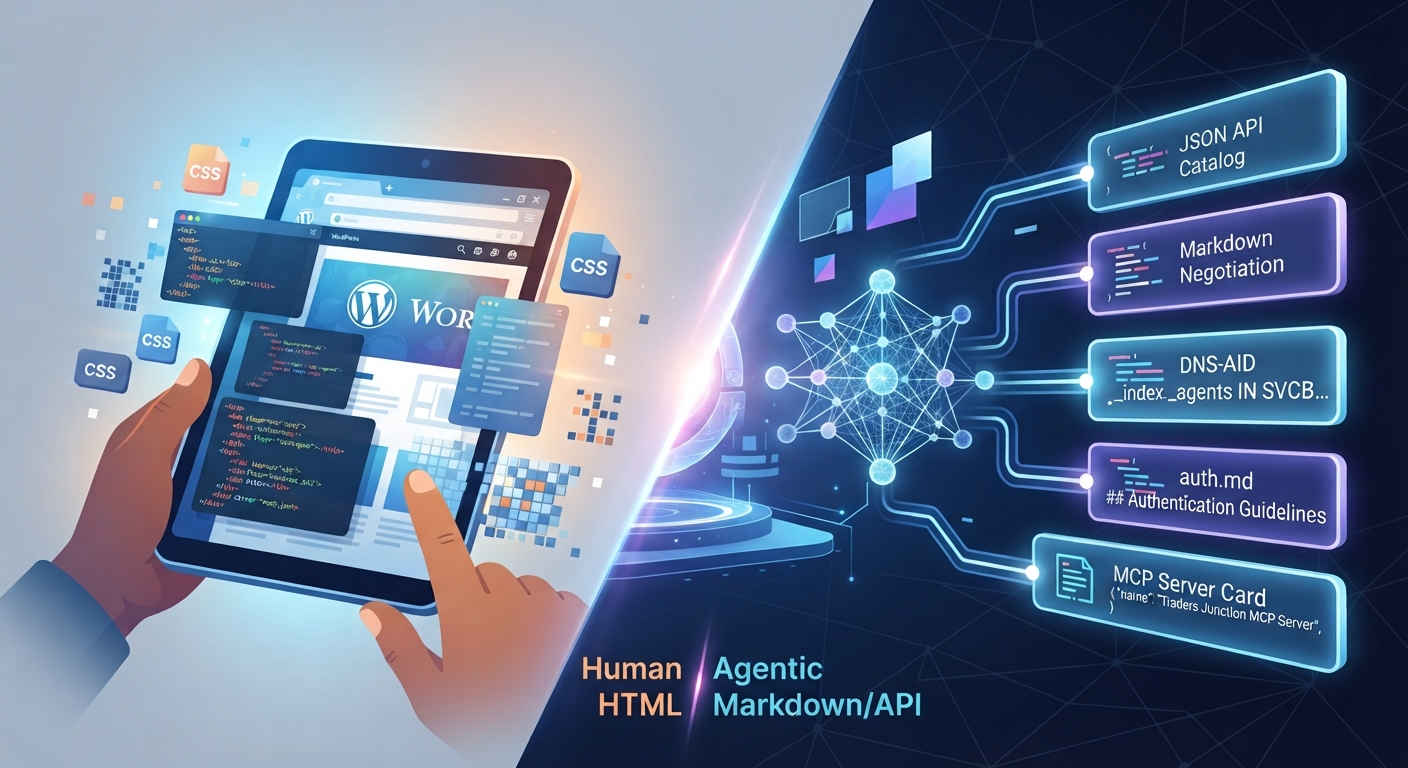
AI-agent discovery Autonomous Web: Optimizing WordPress for AI
The Autonomous Web Paradigm: Optimizing WordPress Infrastructure for AI-Agent Discovery and Content Negotiation The digital landscape is undergoing a massive transformation. Furthermore, for decades, search engine optimization focused exclusively on human-facing metrics. Developers optimized page speed for human browsers, wrote copy for human psychology, and built visual interfaces for human eyes. Today, a new era is taking over: the agentic web. Consequently, autonomous AI-agent discovery, automated scrapers, and smart web-browsing workflows traverse the internet daily. These tools fetch data, execute tasks, and curate services for users automatically. However, if your website is built solely for human visitors, you are missing an automated economy. Modern web development must evolve. Most importantly, it needs to serve both biological users and autonomous machine agents seamlessly through advanced content negotiation. Understanding AI-Agent Discovery: The Shift from HTML to Markdown Traditional web servers are built with a single assumption. Namely, every incoming request comes from a graphical browser demanding a heavy HTML document. When an AI-agent discovery tool pings your server, delivering a massive DOM tree is highly inefficient. Heavy CSS files, tracking pixels, and styling wrappers increase token consumption. Additionally, they slow down ingestion speed for large language models. Agentic web discovery solves this with server-side content negotiation. When an intelligent agent issues a request with the header Accept: text/markdown, your server changes its output stream accordingly. Instead of heavy HTML, the server delivers a clean, structured Markdown document. Ultimately, this guarantees that AI parsers ingest your core services instantly using a fraction of the computing power required by traditional scrapers. The Technical Anatomy of Modern Web Domains for AI-Agent Discovery and Autonomous Crawlers Building a website that satisfies human intent and machine compliance requires an infrastructure upgrade. Specifically, modern technical audits evaluate specific markers to check if a domain supports autonomous interactions: Bridging Creative Services and the Digital Economy via AI-Agent Discovery Digital agencies offer multi-faceted solutions like web development, SEO, and custom design. Translating these complex services into data structures that AI systems can recommend is a major hurdle. For example, when an enterprise AI agent searches for a technical partner, it does not browse aesthetic galleries. Instead, it queries structured metadata and markdown catalogs. By organizing your service architecture into clean formats, you enable automated procurement systems to recommend your agency. Imagine an automated corporate workflow sourcing a web developer and an SEO strategist. If your domain exposes a valid MCP card, that AI agent indexes your portfolio instantly without rendering blocks. Crafting High-Impact Content Strategy for Mixed Audiences and AI-Agent Discovery Balancing technical machine optimization with traditional search readability requires a disciplined framework. While your server delivers markdown for bots, your published articles must simultaneously satisfy human search intent. To rank successfully for high-intent niches like agentic web optimization, your content must maintain strict structural integrity: Step-by-Step Implementation Guide for Modern Web Development Agencies Upgrading your web agency’s digital infrastructure to support next-generation AI discovery involves a systematic technical rollout. Therefore, follow this checklist carefully: The Role of Structured Data and Semantic Markup in Programmatic Workflows Content negotiation handles how raw text is ingested by automated parsers. However, structural metadata remains the foundational bedrock for AI trust. Traditionally, SEO relied on human-facing schemas like local business markup and FAQs. In the era of agentic web discovery, structured data must serve programmatic workflows. When an AI crawler inspects your web infrastructure, it looks beyond visual tags. Instead, it analyzes deep semantic hierarchies that define your pricing frameworks and technical capabilities. Implementing advanced JSON-LD schemas ensures automated agents map your agency offerings without ambiguity. Maximizing Long-Term ROI Through Proactive Infrastructure Engineering The transition to agent-ready web architecture requires a mindset shift from reactive optimization to proactive engineering. Most digital agencies wait for algorithm updates before revising strategies. Yet, the rise of autonomous AI agents demands an immediate technical rollout. By combining human readability standards with robust machine-readable endpoints, you build a resilient digital footprint. Agencies adopting these protocols today position themselves as market leaders. As a result, they secure a massive advantage in an automated economy. Overcoming Technical Hurdles in Restrictive Shared Hosting Environments Deploying advanced agent architecture presents challenges on restrictive shared hosting environments. Although Cloudflare allows native edge routing, standard control panels often lack support for experimental records like HTTPS/SVCB. Developers can bypass this using backend routing workarounds and custom PHP hooks. By intercepting incoming client requests at the .htaccess level, your server evaluates user-agent strings dynamically. If an automated tool requests machine data, the backend serves pre-cached markdown files. Consequently, this ensures full autonomous compatibility within standard hosting constraints. Measuring the Impact of Autonomous Traffic and Server Telemetry As search engines shift to programmatic API discovery, traditional analytics dashboards must evolve. Tracking bounce rates is no longer sufficient when traffic originates from automated bots and LLM crawlers. Measuring success in the agentic web era requires monitoring specialized telemetry. Specifically, track markdown request frequencies, API catalog response codes, and endpoint hit rates. By integrating custom server-side logging, your digital agency can gauge its market penetration. This granular data enables continuous refinement of your semantic markup for recommendation engines. Future-Proofing Your Digital Agency for the Next Digital Era The transition from human-only browsing to hybrid human-agent ecosystems represents the biggest shift in web design history. Agencies embracing agentic compliance and structured APIs will dominate search engine rankings. Conversely, those ignoring these standards will become invisible to modern digital consumers. By future-proofing your technical stack today, you position your brand at the forefront of the digital economy. As the ecosystem shifts toward autonomous machine interactions, optimizing for AI-agent discovery is no longer optional. Indeed, it is the definitive edge for modern agencies. Implementing advanced content negotiation and markdown endpoints ensures your services remain fully visible to both human clients and intelligent software agents.

Custom LLM Pipelines: Why Pre-Built AI Wrappers Fail at Scale
When businesses rush to adopt artificial intelligence, custom LLM pipelines often take a backseat to quick, pre-built solutions. The tech landscape is flooded with ready-to-use AI wrappers—lightweight apps that simply slap a user-friendly interface onto commercial APIs like OpenAI or Anthropic. However, for a basic chatbot or a simple proof-of-concept, these wrappers seem like a dream come true. However, as startups grow and enterprises demand heavy data processing, security compliance, and reliable uptime, these generic tools quickly hit a brick wall. Scaling an AI-driven product requires far more than basic API calls; it demands a robust, purpose-built architecture. If your digital product is struggling with performance bottlenecks, unpredictable costs, or data privacy concerns, it’s time to look under the hood. Let’s break down why pre-built wrappers crumble under pressure and why engineering custom LLM pipelines from scratch is the ultimate solution for long-term scalability. Understanding AI Wrappers vs. Custom LLM Pipelines To understand why scaling breaks down, we need to look at how both approaches are structured from a development perspective. Why Pre-Built AI Wrappers Fail at Enterprise Scale Relying on a generic wrapper might get your app live in a week, but it introduces critical vulnerabilities as user concurrency increases. Custom LLM Pipelines vs. Pre-Built Wrappers: Direct Comparison Feature Pre-Built AI Wrappers Custom LLM Pipelines Architecture Simple API frontend wrapper Multi-layered backend engineering Scalability Limited by third-party rate caps Highly scalable with load balancing Data Security Vulnerable to external data policies Enterprise-grade, localized control Cost Efficiency High long-term token waste Optimized via caching and smart routing Best Used For Prototyping, MVP testing, basic tasks Enterprise software, SaaS platforms, high-data apps How Custom LLM Pipelines Solve Scaling Bottlenecks Transitioning to a custom architecture gives development teams the granular control needed to handle heavy enterprise workloads without breaking a sweat. Conclusion While AI wrappers serve a purpose during the initial brainstorming phase, they are structural dead-ends for serious digital products. Building custom LLM pipelines ensures your software remains secure, cost-efficient, and lightning-fast as your user base expands. Ready to scale your software with enterprise-grade architecture? Explore advanced development solutions at De Buggers to build secure, high-performance AI applications from the ground up.